Http
Http
FuzeHttp[github] is a web framework written in C++23, designed for modern REST API-based services. It is gradually being developed in an ad-hoc way, to meet the growing needs of Fuze Mediaboard.
Building the example project
The easiest way to get started is to set up the example project, and then work from there. If you have deployed Fuze Mediaboard before, these steps will be very familiar.Compiling from source
Prerequisites: Git, CMake (>= 3.28), Boost (>= 1.88), SQLite OR PostgreSQL.
First ensure that submodules are downloaded. Use this command:
git submodule update --init --recursive
Now, to compile the server:
cmake -B build -G Ninja -D WITH_EXAMPLE=ON
cmake --build build
Compiling is known to work with clang-19, but not GCC 14.
Running the example project
This is the same procedure to create the owner account, as in Fuze Mediaboard.
If compiled from source, execute ./build/bin/example --create_owner
The --create_owner flag is required on first boot. When the server starts, an invitation link will appear in the command-line output.
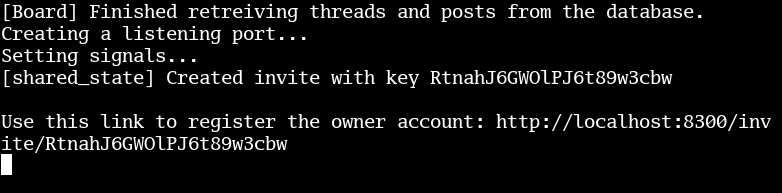
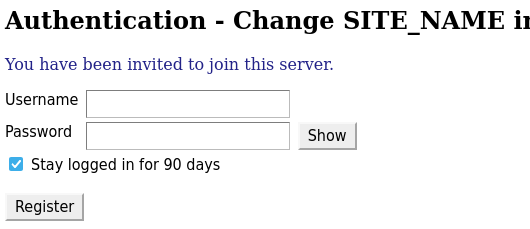
If you ever forget the password, you can simply run the create_owner command again. Note that it will not be the same account.
Program options
Options can be defined in config.ini or passed in at runtime. Run the server with --help to see all available options. Some options are built-in, such as threads and environment_variable_for_secret.
Additional options can be defined. The container for additional options is instantiated in this way:
FuzeHttp::ProgramOptions options;
See the example project's addProgramOptions function:
options->addOptions()
	("favicon_url", std::string("https://fuze.page/favicon.ico"))
	("site_name", &state_config->server_name, {.default_value=std::string("FuzeHttp Example")})
	("test_program_constant", 73, {.is_option = false})
The second can be either a value or a pointer.
The third parameter takes an optional struct:
template
struct OptionArgs {
	std::optional<std::remove_pointer_t<OptionType>> default_value;
	const char* description = "";
	bool include_in_frontend = true;
	bool is_option = true;
}; OptionType, which can be any type with an operator>> overload.
Frontend
Unlike MVC frameworks, FuzeHttp does not provide live SSR.
File inclusion
Relative paths to files should be prepended with FILE_, so that cache control will work properly. Otherwise, the client can load files from different versions, leading to unreproducible errors. For example:
<link rel="stylesheet" href=FILE_"static/styles.css">
This should not be done for external resources, only internal assets contained in the frontend folder.
Using program options
ProgramOption, ProgramOptionPtr, and ProgramConstant entries can be included in the frontend, by prepending CONFIG_ to the key. On startup, the server will fill in the values.
Given the example project has this option entry:
(new ProgramConstant("test_program_constant", 73))
CONFIG_test_program_constant is replaced with 73.
Controller
All HTTP requests are routed through the controller. A pattern can be added to the controller, which matches a request URL to a view.
Pattern
URLs can be added to the controller with the following function:
template<typename... Types>
	void addPattern(http::verb req_method, typename MakeFuncPtr<StateType, typename GetHandlerArgs<TypeList<Types...>, ToHandlerArg>::type>::type view, Types... args)
A pattern consists of a method, a callback, an optional Client parameter, and a set of path segments. Path segments can be const char*, int{}, std::string{}, or a Resolver.
Resolver
A resolver is a user-specified overload of ResolverBase. It can pass an object or pointer into the view, or return a user-defined Response, typically with an error status when the object is not found or authorization failed.
Example
resolvers.cppm - Fuze Mediaboard
template<PERMISSION permission = PERMISSION::NUMBER_OF_PERMISSIONS> // NUMBER_OF_PERMISSIONS means "none"
struct BoardResolver : Resolver<State*, Board*, std::string> {
	virtual std::expected<void, Response> validateExtraPermission(Board* board, const std::optional<Client>& client) const {return {};}
	std::expected<std::any, FuzeHttp::Response> fetch(State* state, std::string key, const std::optional<Client>& client) const override {
		auto board_res = state->getBoardIfExists(key);
		if (!board_res)
			return std::unexpected(Response{.status=http::status::not_found, .error_message=std::format("Could not find board with slug {}", key)});
		auto board = board_res.value();
		if (!board->clientHasPermission(client, static_cast<int>(PERMISSION::VIEW_BOARD))) {
			return std::unexpected(Response{.status=http::status::forbidden, .error_message=std::format("Client does not have permission to access board `{}`", key)});
		}
		if (auto permission_res = validateExtraPermission(board, client); !permission_res)
			return std::unexpected(permission_res.error());
		return board;
	}
};

template<PERMISSION permission>
requires (permission != PERMISSION::NUMBER_OF_PERMISSIONS)
struct BoardResolver<permission> : BoardResolver<PERMISSION::NUMBER_OF_PERMISSIONS> {
	virtual std::expected<void, Response> validateExtraPermission(Board* board, const std::optional<Client>& client) const override {
		if (!board->clientHasPermission(client, static_cast<int>(permission)))
			return std::unexpected(Response{.status=http::status::forbidden, .error_message=std::format("Client does not have permission to perform this action on board `{}`", board->getSlug())});
		return {}; // success
	}
};
urls.cppm - Fuze Mediaboard
	(verb::get, getBoard, 							"api", "board", BoardResolver{})
	(verb::put, editBoard, Client{},				"api", "board", BoardResolver<PERMISSION::CREATE_BOARD>{})
	(verb::delete_, deleteBoard, Client{},			"api", "board", BoardResolver<PERMISSION::DELETE_BOARD>{})
views.cppm - Fuze Mediaboard
FuzeHttp::Response deleteBoard(Mediaboard::State* state, FuzeHttp::Request req, Client client, Board* board) {
	// permission to delete board has been checked by the Resolver
	board->markAsDeleted();
	return Response{.status = http::status::no_content};
}
ResolverBase
Example
resolvers.cppm - Fuze Mediaboard
template<PERMISSION permission = PERMISSION::NUMBER_OF_PERMISSIONS>
struct ThreadResolver : Resolver<State*, Thread*, int, Board*> {
	virtual std::expected<void, Response> validateExtraPermission(Thread* thread, const std::optional<Client>& client) const {return {};}
	std::expected<std::any, FuzeHttp::Response> fetch(State* state, int thread_id, Board* board, const std::optional<Client>& client) const override {
		if (!board->threadExists(thread_id))
			return std::unexpected(Response{.status = http::status::not_found, .error_message = std::format("Thread {} was not found.", thread_id)});
		Thread* thread = board->getThread(thread_id);
		// ...
urls.cppm - Fuze Mediaboard
	// A resolver which takes a parent object must have the parent existing as an earlier segment
	// ie, ThreadResolver relies on the value returned from BoardResolver
	(verb::get, getThread, 							"api", "board", BoardResolver{}, "thread", ThreadResolver{})
View
This is a callback function which is called when its corresponding pattern in the controller matches the request URL. Every view contains arguments for the state and the request, plus variable path segments.
Response
Every view must return a FuzeHttp::Response. The status is required.
struct Response {
	beast::http::status status;
	std::unordered_map<std::string, std::string> headers;
	std::optional<std::string> error_message;
	std::optional<boost::json::value> json;
	std::optional<std::filesystem::path> file;
	std::optional<std::string> body;
};